Links
Overview
Links represent the relationship between adapter entities and locker entities and are gatekeepers to the synchronization process. How a link is configured determines when entities are synchronized, how adapter entities and locker entities are joined and what entity data can be synchronized and in what direction. Links control when and how new entities are provisioned and deprovisioned in the target entity space and can also perform custom tasks before or after the provisioning occurs.
Configuration
Links require the following basic configuration:
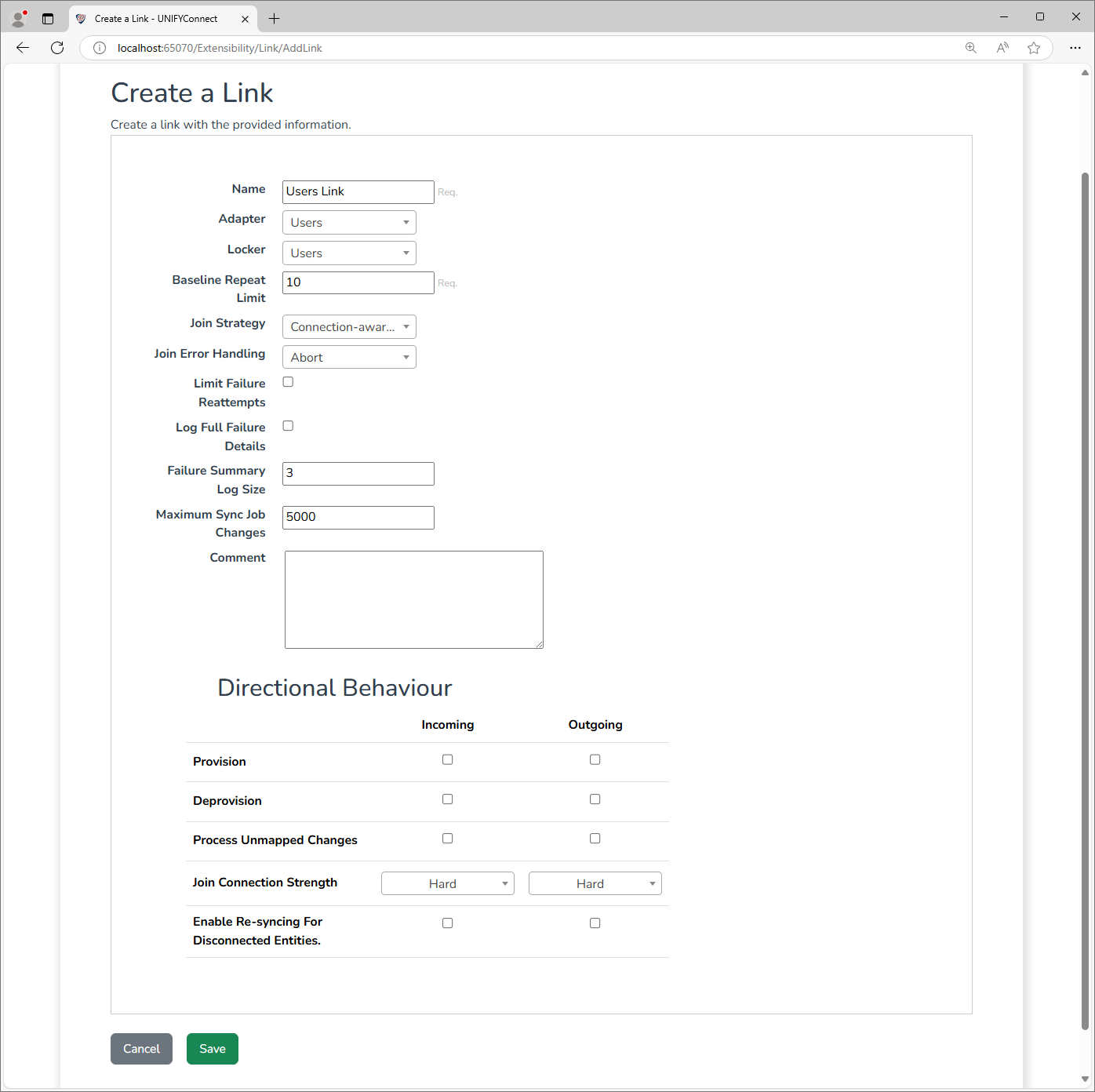
| Name | Description |
|---|---|
| Name | The display name of the link. Should be descriptive of its function. |
| Adapter | The adapter that should be associated with this link. |
| Locker | The locker that should be associated with this link. |
| Baseline Repeat Limit | The number of times a baseline will automatically repeat in the event of delayed entities. See DelaySync for more information. |
| Join Strategy | Choose the join strategy for this link. The recommended choice is Connection-aware Join Resolution. See below for more information on the join strategies. |
| Limit Failure Reattempts | If a limit should be imposed on the number of times a failing change can be re-queued to be attempted again in a subsequent synchronization. |
| Failure Reattempts | The maximum number of times a change will be reattempted before it is dropped. Required if Limit Failure Reattempts is selected. |
| Log Full Failure Details | If the full details of a synchronization's failed changes should be logged. If not enabled, a short summary of the failures is logged instead. Enable this feature can produce a large number of log messages, and this can have a negative performance impact. It is recommended to only enable this feature for debugging purposes. |
| Failure Summary Log Size | The amount of entity details to include in the summary log message produced when a synchronization has failing changes. This settings is not used if Log Full Failure Details is enabled. |
| Maximum Sync Job Changes | The number of changes to include in a single sync processing job. Sync runs that require more changes than this number will be chunked into multiple jobs, and similar jobs with changes amounting to less than this number may be merged. |
INFO
As your source/target schema and mappings grow, scale Maximum Sync Job Changes to a conservative value to limit memory usage per sync job and reduce the risk of out-of-memory errors.Example: For each 10 schema fields, lower Maximum Sync Job Changes by 1,000.
Directional Behaviour
The following options are available to be configured for both Incoming (adapter to locker) and Outgoing (locker to adapter) synchronizations.
| Name | Description |
|---|---|
| Provision | If the link should provision (create) target entities when new source entities are detected during a synchronisation in this direction. |
| Deprovision | If the link should deprovision (delete) target entities when the removal of existing source entities are detected during incoming synchronisation. |
| Process Unmapped Changes | If disabled, source schema fields for which there are no mappings configured will not be considered when determining in source entities have changed, and thus needs to be processed by the link. Enabling this option causes all schema fields to be evaluated. However, the target entity will not be updated unless changes to mapped fields are made. |
| Join Connection Strength | Determines the strength of the connection between synchronised source and target entities in this direction, and the behaviour for when the join conditions which spawned those connections changes. See the Connections and Disconnections section below for more information. |
| Enable Re-syncing for Disconnected Entities | If enabled, when source and target entities are disconnected from one another sync changes will be automatically created on on all other links involving the target entities. See Connections and Disconnections section below for more information. |
Connections
When a source entity is successfully synchronized to a target context, either provisioning a new target entity or joining onto an existing one, a connection between those entities is created. This connection is used in subsequent synchronizations to determine the current sync state of the source and target entities and influences how the synchronization in question is performed.
The Join Connection Strength link configuration item controls what happens when the source entity has changes to a field used in the links join criteria.
| Connection Strength | On Join Field Changes |
|---|---|
| Hard | The source and target entities will remain connected, even if there is another target entity that the source entity could join to according to the join criteria. The target entities join criteria fields may be updated if there are the appropriate mappings configured, but even if not the connection will remain. |
| Soft | The source and target entities are disconnected, and the source entity may be joined to another target entity if one is available, or have a new target entity provisioned if the link is configured to do so. No changes are made to the original target entity, and if it satisfies the join criteria for another source entity it is free to be re-connected, even in the same synchronisation job. If not, and the link is configured to do so, it will still be deprovisioned. |
| Immutable | Source and target entities cannot have changes made to fields used in the links join criteria, and any attempt to do so will fail the synchronisation for offending entities. |
Disconnections
Disconnections are when the connection created by a previous synchronization is broken. As described above, this can occur when using a soft connection strength. Disconnections also occur when a source target entity is deleted, but the link is not configured to allow deprovisions.
Disconnections make the target entity available to be re-joined to another source entity, but no changes are made to the target entity as part of the deprovisioning. This means that after a disconnection, values with an origin in the source entity will remain as part of the target entity, and will continue to remain until another source entity (from any link) overwrites them as part of a synchronisation. The Enable Re-syncing For Disconnected Entities link configuration option can be enabled to help alleviate this, should it be an issue, by generating sync changes on all other links that have created connections involving disconnected target entities. This ensures that the target entity will be updated with the most appropriate values, as determined by the join, mapping and priority rules across all links.
Note that the generated sync changes will operate on the parent links sync changes schedule, which must be configured and enabled for the sync changes to be processed. Also, note that this process will only update in accordance with the configured links rules. This means that target entity values that were sole provided by the link on which the disconnect occurred will never be replaced or removed. There is no capacity to remove the influence of disconnected source entity from a target entity in isolation.
Join Strategies
Connection-aware Join Resolution
The recommended join strategy for all links. This join strategy takes into account connections between locker and adapter entities created by joins made in previous synchronizations. It will correctly handle situations where the values of join fields change; favouring updates to already connected entities over provisioning new entities.
This strategy is also more strict than the Simple join strategy, preventing joins from completing when the result is ambiguous or incorrect, such as when attempting to join an entity to another when either is already joined to a third entity. This join strategy will automatically correct issues such as these where possible, and fail the synchronization where it cannot. This may seem like a negative, however this is required to protect the data integrity of the locker or adapter being synchronized to. If these kinds of synchronization failures occur regularly, it may be a sign of issues with either the way UNIFYConnect has been configured, or with the entity data being processed.
Simple Join Resolution
The original, default join strategy in UNIFYBroker Plus v5.3.0 and older. This strategy uses only basic value-matching for determining joins, so can lead to issues or undesirable behaviour in situations when the values of join fields change.
DEPRECATED
This join strategy is available for legacy support only; it is not supported for use going forward. This strategy will be removed in future releases
Join Error Handling
The link join error handling configuration is used to determine how to handle join errors when using connection-aware join strategy.
| Join Error Handling | Description |
|---|---|
| Abort | If an error is encountered, the entire synchronization process will be aborted with no changes. |
| Skip, Log and Drop | Will skip any sync changes that result in a join error, continuing with the synchronization, and writing the error details to the log. |
| Skip, Log and Re-queue | Will skip any sync changes that result in a join error, continuing with the synchronization, and writing the error details to the log.Also treats the join error as a failed sync, and re-queues the sync change to be attempted again in line with the link's Failure Reattempts configurations. |
Pre Filtering Threshold Configuration
The entityIdPreFilteringThreshold option can be configured in the link configuration file.
When the number of polling changes in a sync operation is below this threshold, the process of entity retrieval from the database will filter the entities using the IDs from the sync changes. This optimization improves performance by making syncing more efficient for small change sets. Note that setting the threshold to an extremely large value (in the thousands) may cause the sync process to fail. It is recommended to use smaller values for optimal performance.
Additional Configuration
Other configuration for links can be found on specific pages, listed below.