Complex Insertion Transformation
Overview
The complex insertion transformation is used to insert entity values into the JSON structure of a complex field.
Use Cases
The complex insertion can be used to accomplish the following:
- Generate arbitrary JSON from entity data required by connected schema
- Update complex field with values extracted by a complex extraction transformation and modified by another transformation
- Used in conjunction with a Complex Extraction transformation for two-way complex value mapping
Prerequisites
None
Contribution
This transformation can add a new complex field, if needed.
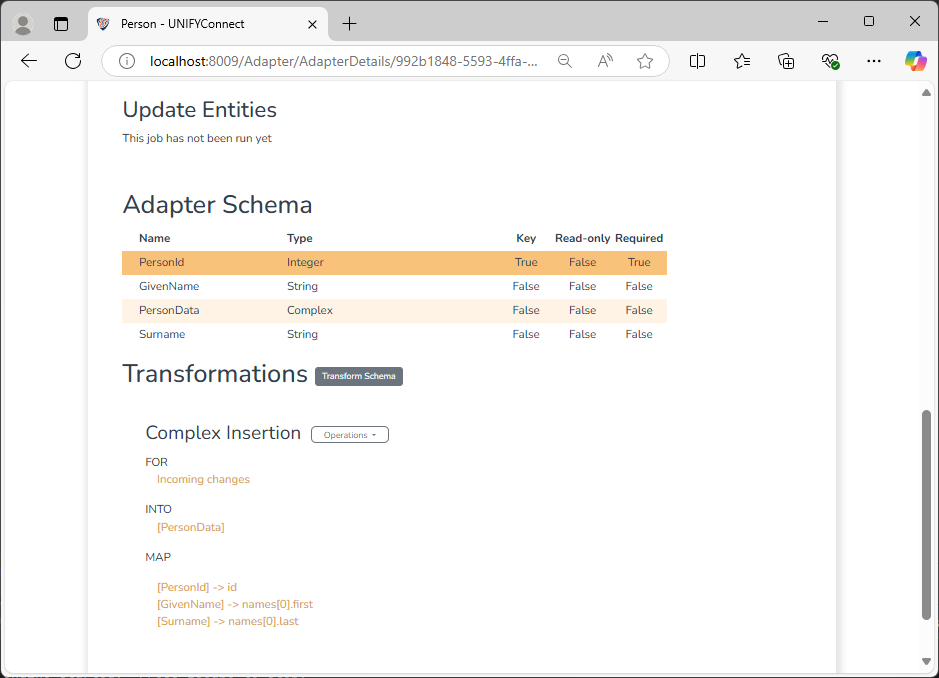
Configuration
The complex insertion transformation requires the following by way of configuration:
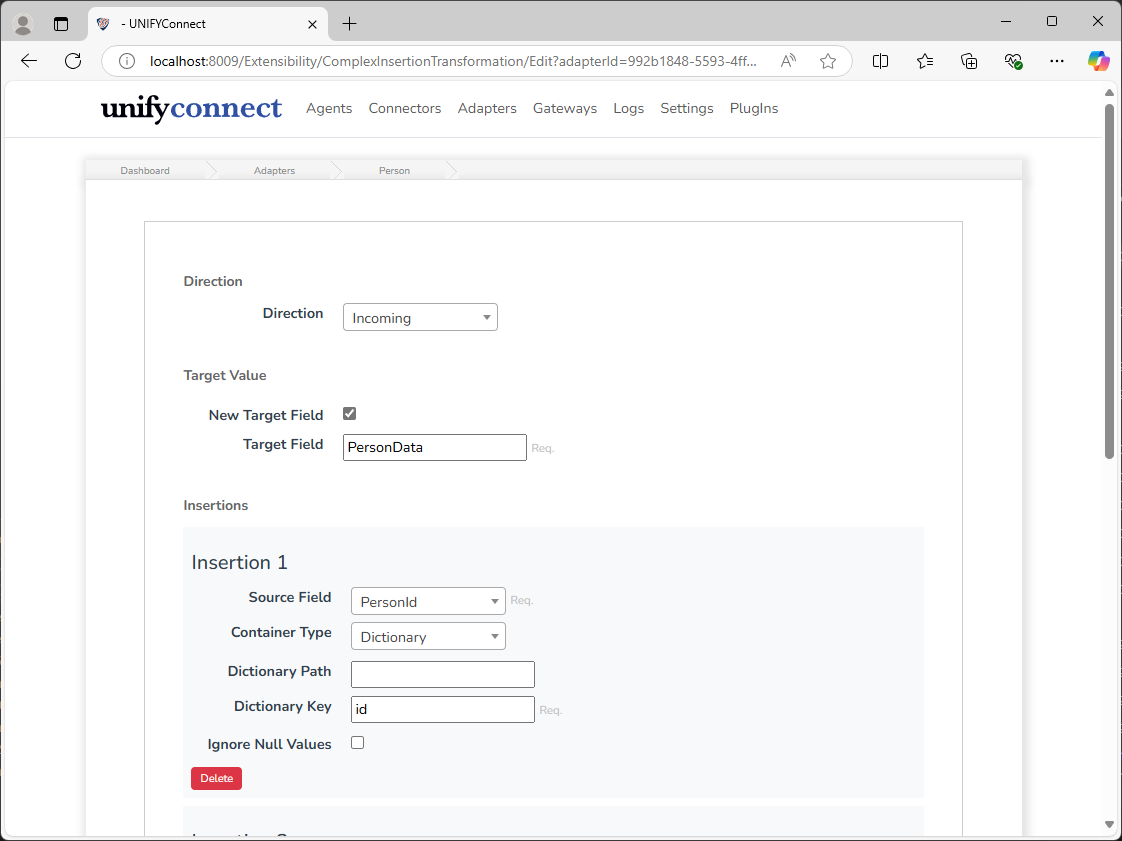
| Attribute | Description |
|---|---|
| Direction | The direction that the transformation will be applied in. Incoming will apply the transformation to connector entity changes. Outgoing will apply the transformation to changes from gateways or Plus links. |
| New Target Field | If a new complex field should be created instead of inserting into an existing one.This option is only available for Incoming transformations. |
| Target Field | The name for the new complex field, or the existing complex field for the selected value to be inserted into.For Outgoing transformations, this can only be set to an existing schema field. |
| Insertions | A set of insertion instructions. These will be executed in the configured order. |
Insertion Configuration
| Attribute | Description |
|---|---|
| Source Field | The schema field to source data from that will be inserted into the complex value. |
| Container Type | The type of container, or data structure, that the value will be inserted into. See below for more details on how value and containers are mapped. |
| Dictionary/Array Path | A JSON path specifying the container that the value will be inserted into. Required if the Container Type is Array. See below for details on supported JSON path syntax and how this affects insertion. |
| Dictionary Key | The key for the value when inserted into a dictionary. Required if the Container Type is Dictionary. |
| Placement | Determines how the value should be inserted into an array. If Container Type is Array then this must be set. See below for details on how each placement mode behaves. |
| Array Index | The index for the value when inserted into an array. Required if the Container Type is Array and the Placement is Index Set or Index Insert. See below for the options and behaviours related to the index provided. |
| Ignore Null Values | If null values should be inserted or ignored |
Change Processing
During the change detection process, a change will be flagged for an entity if the Source field has been updated.
Insertion Mapping
Dictionary/Array Path
The dictionary and array paths are JSON paths that specifies the location within a complex value structure where the desired insertion container is located. If any part of the path does not already exist within the structure, it will be created. As the top-level data structure of the Complex Value type is a dictionary, not providing an insertion path will target this as the insertion container, though this is only permitted if the Container Type is Dictionary.
Only a subset of all JSON path syntax is supported; that which allows the direct targeting of a specific location. This includes:
- dictionary child section
.name - array member selection
[3](positive indexes only):
TIP
As JSON paths used in the Complex Insertion transformation are always treated as relative to the top-level dictionary, the JSON path root node identifier ($.field) is not required, and this and other node selectors are not supported.
The following examples show the results of different container paths.
// Container path: "a"
{
    "a": <insertion container>
}

// Insertion path: "a.b.c"
{
    "a": {
        "b": {
            "c":  <insertion container>
        }
    }
}

// Insertion path: "a[0]"
{
    "a": [
        <insertion container>
    ]
}Dictionary Key
The key that the value will be inserted into the target dictionary container, either the top level or a nested dictionary. This is not a JSON path, and must conform to the JSON key naming standard
// Container type: Dictionary
// Dictionary path: ""
// Value key: "a"
// Value: "example"
{
    "a": "example"
}

// Container type: Dictionary
// Dictionary path: "x"
// Value key: "a"
// Value: "example"
{
    "x": {
        "a": "example"
    }
}

// Container type: Dictionary
// Dictionary path: "x[0]"
// Value key: "a"
// Value: "example"
{
    "x": [
        {
            "a": "example"
        }
    ]
}

// Container type: Dictionary
// Dictionary path: "x[0].y"
// Value key: "a"
// Value: "example"
{
    "x": [
        {
            "y": {
                "a": "example"
            }
        }
    ]
}Array Placement
When Container Type is Array a Placement must be set. If the placement is configured to Start orEnd, the inserted value is prepend or append the value to the array,respectively .
TheIndex Set and Index Insert placement options require a positive, zero-based index value to be set, and the value will be inserted into the targeted array at this index, with the array padded with null values if the index is greater than the arrays current length.Index Set will replace a value if one already exists at the specified index, while Index Insert will add the value between the items before and at the specified index.
Following are a number of examples, showing the resulting complex value after insertion using array index placements:
// Original complex value
{
    "arr": [
        "one",
        "two",
        "three"
    }
}

// Placement: Index Set
// Index: 2
// Value: "example"
{
    "arr": [
        "one",
        "two",
        "example"
    }
}

// Placement: Index Insert
// Index: 1
// Value: "example"
{
    "arr": [
        "one",
        "two",
        "example",
        "three"
    }
}

// Placement: Index Insert or Index Set
// Index: 5
// Value: "example"
{
    "arr": [
        "one",
        "two"
        "three",
        null,
        null,
        "example",
    }
}