FTP Agent
Overview
An FTP agent encapsulates the connection details to a single instance of an FTP server (FTP and FTPS).
Operational Considerations
Operations reliant on the FTP agent will not function as expected if the agent is not configured correctly. The following should be considered when configuring this agent:
- Which transport types are supported or required by the target FTP instances
- Connection time-out limits of the target server
- Access privileges of the user connection details
WARNING
At this time, the FTP agent does not not support Write operations.
Usages
The FTP agent is used by the following connectors:
Configuration
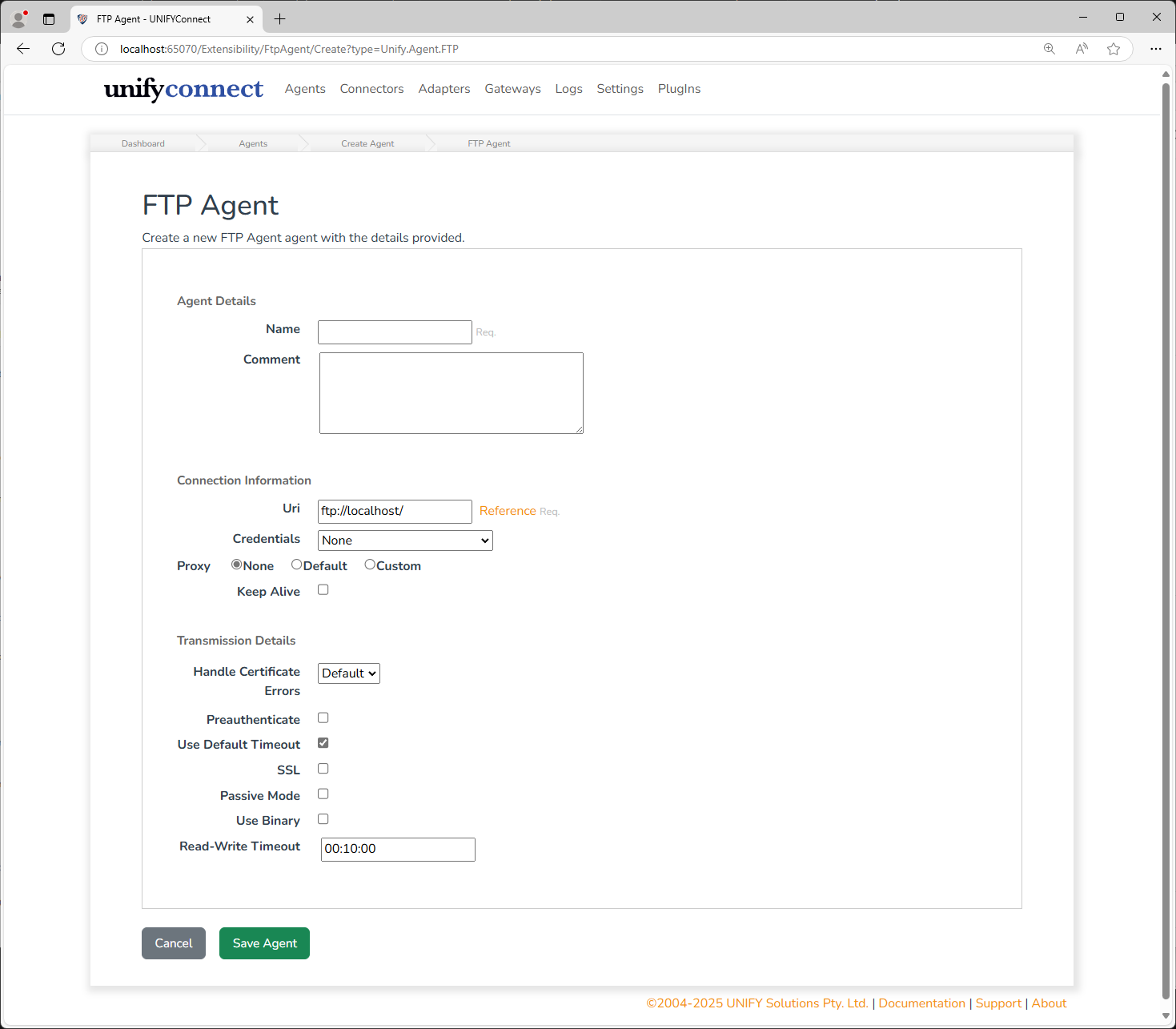
In addition to the common agent configuration shared by all agents, the FTP agent requires the following by way of configuration:
| Name | Supports References | Description |
|---|---|---|
| Uri | yes | The uri describing the location of the server. This should be an ftp uri in the format of: ftp://{servername}:{port} |
| Credentials | no | The type of credential to be used when connecting to the FTP server. |
| Account Name | yes | Only required when Credentials is _Custom_The account name used to authenticate against the FTP server. |
| Password | yes | Only required when Credentials is _Custom_The password corresponding to the given account name. |
| Proxy | no | Whether or not to use a proxy. In the case of the FTP agent, the default is no proxy. |
| Proxy Uri | yes | Only required when Proxy is _Custom_The uri describing the location of the proxy server. |
| Credentials (Proxy) | no | Only required when Proxy is _Custom_The credentials to be supplied when communicating with the defined proxy server. |
| Username (Proxy) | yes | Only required when Proxy and Credentials (Proxy) are both CustomThe account name used to authenticate against the proxy server. |
| Password (Proxy) | yes | Only required when Proxy and Credentials (Proxy) are both CustomThe password corresponding to the given proxy account name. |
| Keep Alive | no | Whether the connection should be kept alive. This is suggested for implementations with a high volume of activity (specifically exports). |
| Ignore Certificate Errors | no | Whether certificate errors can be ignored, or whether the operation should fail out. |
| Preauthenticate | no | Only supplied for other web request operations**,** this is not used in FTP requests. |
| Use Default Timeout | no | Whether to use the default timeout defined for FTP connections, or to define your own. |
| Timeout | no | Only required when Use Default Timeout _is not set._The time-out to be applied after which the connection will be closed. |
| SSL | no | Whether to enable SSL on the client side (FTPS) - whether this is required / possible will depend entirely on the configuration of the target FTP server. |
| Passive Mode | no | Whether the server is expecting the Passive FTP mode or Active FTP mode. |
| Use Binary | no | Whether to communicate with the server through binary messages. |
| Read-write time-out | no | The time-out after which the connection will be severed between read and write operations. |