PowerShell Configuration
The following extensibility files have PowerShell configuration options available:
AdapterEngine.config.jsonAuditingEngine.config.jsonChannelEngine.config.jsonConnectorEngine.config.jsonLoggingEngine.config.json
In each file, PowerShell configuration is stored in a standard JSON object named powerShellSettings.
Extensibility Configuration
Each configuration object has a schema version. This page describes the latest versions. Older versions remain compatible, but when you use properties described here, update the corresponding object version as shown.
PowerShell Settings
| Property | Description | Required |
|---|---|---|
$version | The object version: 1.1 | Yes |
executionMode | Selects the execution mode. Valid values are OutOfProcessWorker, InProcessSharedRunspaces and InProcessLegacy. | No, default is OutOfProcessWorker |
powerShellExecutionPolicy | Sets the execution policy for scripts. Valid values are Unrestricted, RemoteSigned, AllSigned, Restricted, and Bypass. See Changing PowerShell Execution Policy. | No, default is null |
usageSettings | A collection of settings for the different PowerShell script usages. See the Usage Settings section below. | No, default is null |
outOfProcessSettings | Settings specific to the OutOfProcessWorker execution mode. See the Out-of-process Settings section below. | No, default uses the default values listed in the Out-of-process Settings |
"powerShellSettings": {
  "$version": "1.1",
  "executionMode": "OutOfProcessWorker",
  "powerShellExecutionPolicy": null,
  "usageSettings": [],
  "outOfProcessSettings": {
    "$version": "1.0",
    "workerLifetimeLimit": {
      "$fmt": "timeSpan",
      "$value": "24:00:00"
    },
    "workerMemoryLimit": 1073741824,
    "workerMaxConcurrentExecutions": 200
  }
}Usage Settings
Usage settings apply to a specific kind of PowerShell script. Most environments do not need them; use them to override the execution location or managed-runspace limits for a particular script type.
| Property | Description | Required |
|---|---|---|
$version | The object version: 1.0 | Yes |
scriptType | The type of script to which the settings apply. See the table below for valid values. | Yes |
executionLocationOverride | Overrides the execution location derived from the executionMode. Valid values are InProcess and WorkerProcess. | No, default is null |
lockWaitTimeout | How long to wait for a runspace in use to be available. Only used for InProcessSharedRunspaces execution mode. | No, default depends on usage type. |
poolGrowthLimit | The maximum number of pooled runspaces. Only used for InProcessSharedRunspaces execution mode. | No, default depends on usage type. |
"usageSettings": [
  {
    "$version": "1.0",
    "scriptType": "Transform",
    "executionLocationOverride": "InProcess",
    "lockWaitTimeout": {
      "$fmt": "timeSpan",
      "$value": "01:05:00"
    },
    "poolGrowthLimit": 5
  }
]Usage Setting Script Types
| Extensibility | Script Types |
|---|---|
| Adapter | Transform, ReverseTransform, TransformSchema, JoinSelection |
| Auditing | Auditing |
| Channel | Channel |
| Connector | GetAll, PollIdChanges, PollIdEntity, PollEntityChanges, Add, Update, Delete, DeleteAll, ModifyAnchor, ChangePassword, Schema |
| Logging | Logging, LogJob |
NOTE
Scheduled log job scripts (LogJob) always run in-process. If the global mode is OutOfProcessWorker, UNIFYConnect uses managed runspaces for these scripts. A WorkerProcess usage override for LogJob is also resolved to in-process execution.
Out-of-process Settings
| Property | Description | Required |
|---|---|---|
$version | The object version: 1.0 | Yes |
workerLifetimeLimit | The maximum lifetime of a worker process. | No, default is 24 hours |
workerMemoryLimit | The worker-process memory limit in bytes. | No, default is 1 GiB (1073741824 bytes) |
workerMaxConcurrentExecutions | The maximum number of scripts that a single worker process may execute concurrently. | No, default is 200 |
"outOfProcessSettings": {
  "$version": "1.0",
  "workerLifetimeLimit": {
    "$fmt": "timeSpan",
    "$value": "24:00:00"
  },
  "workerMemoryLimit": 1073741824,
  "workerMaxConcurrentExecutions": 200
}UI Controls
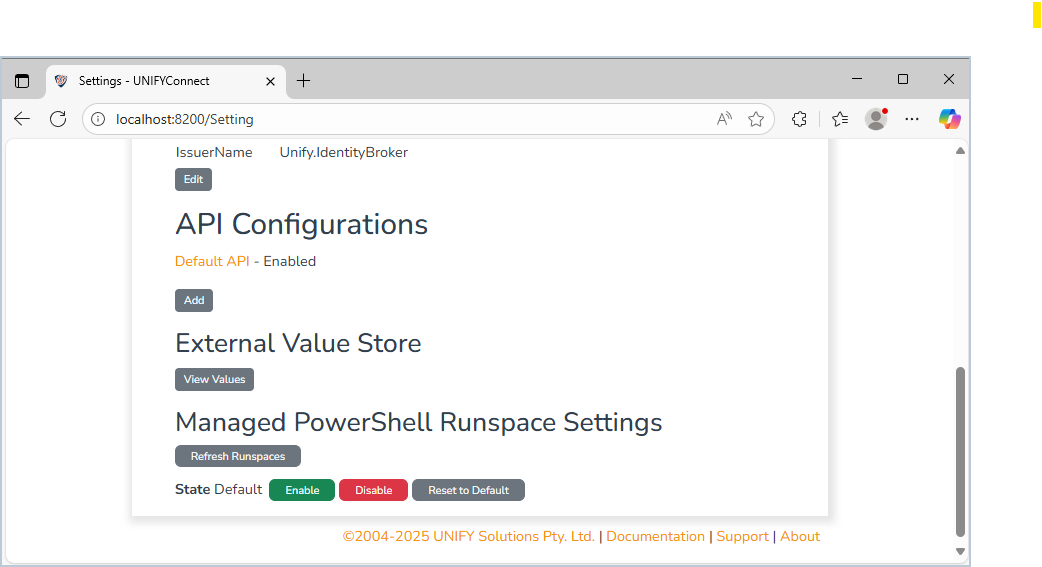
The Settings page provides controls for PowerShell execution. These controls affect only the current runtime state and do not persist changes to disk. They are intended for development and troubleshooting.
Refresh Runspaces
When In-process Shared Runspaces mode is in use, this button immediately disposes of cached PowerShell runspaces, frees their memory, and forces new runspaces to be created.
When Out-of-process Worker mode is in use, this button signals each worker process to complete its current work and terminate.
Managed Runspace State
These controls switch between In-process Shared Runspaces and In-process Legacy modes without restarting the application.
Enable puts all eligible PowerShell usage into In-process Shared Runspaces mode. Disable puts it into In-process Legacy mode. Reset To Default restores the defaults defined in each engine's configuration. These controls are unavailable when the --powershell-force-oop command-line argument is used.
NOTE
After changing the managed-runspace state at runtime, restart the service when practical to release PowerShell global state that cannot be refreshed. Runtime changes are not permanent; update the configuration files for lasting changes.
Command Line Arguments
| Argument | Description |
|---|---|
--powershell-force-oop | Forces all PowerShell usage to be executed using an out-of-process worker service. This argument takes precedence over any extensibility configuration option. |
--powershell-worker-exe-path | Sets a custom path for the worker executable. If omitted, UNIFYConnect uses Services/Workers/PowerShell/Unify.IdentityBroker.PowerShellWorker under the installation directory, with the .exe extension on Windows. |