SSH Agent
Overview
An SSH agent encapsulates the connection details to a single instance of an SSH server (SFTP).
Usages
The SSH agent is used by the following connectors:
Configuration
In addition to the common agent configuration shared by all agents, the SSH agent requires the following by way of configuration:
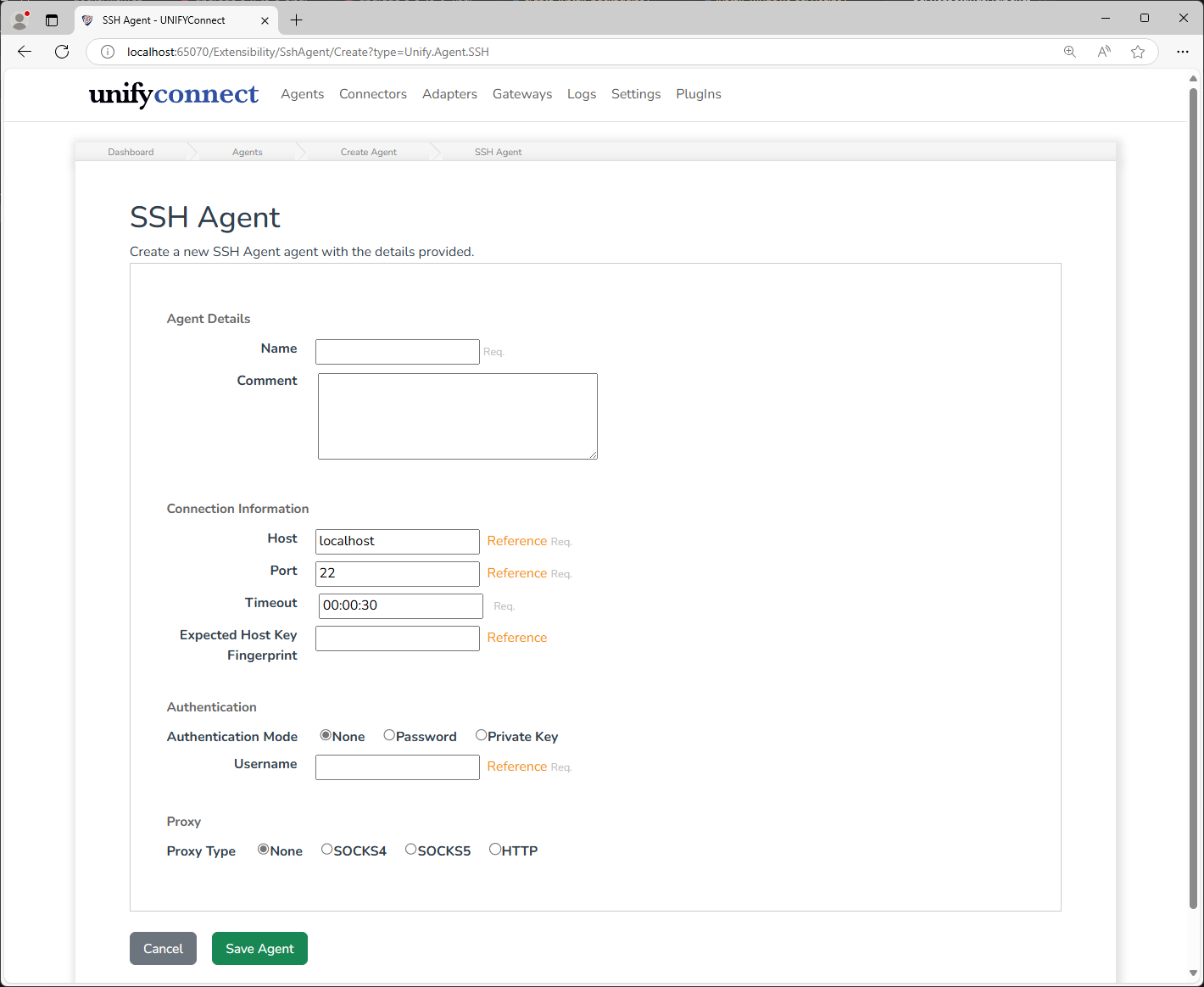
| Name | Supports References | Description |
|---|---|---|
| Host | yes | The name or IP address of the SSH server. |
| Port | yes | The port of the SSH server. |
| Timeout | no | Duration before which SSH requests timeout. |
| Expected Host Key Fingerprint | yes | Optional. The expected fingerprint of the SSH server host key. If provided, the connection will be rejected if the received thumbprint does not match.The thumbprint must be in base64 format, and generated using the md5 hashing algorithm. See below for more information on this field. |
| Authentication Mode | no | The mode of authentication when connecting to the SSH server. |
| Username | yes | The username of the account on the SSH server to authenticate as. |
| Password | yes | The password of the account on the SSH server to authenticate as. Password authentication mode only. |
| Private Key Path | yes | Path to the PEM format private key file for the specified SSH server account. Private Key authentication mode only. |
| Private Key Pass Phrase | yes | Optional pass phrase for the provided private key file. Private Key authentication mode only. |
| Proxy Type | no | The type of proxy server to connect to the SSH server through. |
| Proxy Host | yes | The name or IP address of the proxy server. |
| Proxy Port | yes | The port of the proxy server. |
| Proxy Username | yes | The username of the proxy server account to authenticate |
| Use Binary | yes | The password of the proxy server account to authenticate with. |
Fingerprint Validation
By configuring an Expected Fingerprint, the SSH agent will perform an identity check on the configured SSH server, to ensure it's validity. As described above, this value must be provided in base64 format, and have been generated using the md5 hashing algorithm. The method of retrieving and formatting the fingerprint will vary, but on Linux platforms the following command can be used:
ssh-keygen -l -f /path/to/host/key.pub -E md5 | awk '{print $2}' | sed -e 's/MD5://g' | tr -d ':' | xxd -r -p | base64NOTE
Depending on the SSH server and configuration, one of a number of different host keys may be used depending on the connection negotiation process. In the event of a connection failure due to a unexpected fingerprint, the invalid fingerprint and the name of the host key will be included in the log message, to assist in troubleshooting.
Supported Algorithms and other technical specifications
For a full list of supported algorithms, private key formats, and other supported features, refer to the SSH.NET GitHub page.