Inbuilt Data Explorer Log Writer
Overview
The inbuilt Data Explorer log writer is functionally similar to the Data Explorer Log Writer. Refer to that documentation for requirements and operation details.
Configuration
The inbuilt Data Explorer log writer requires the following by way of configuration.
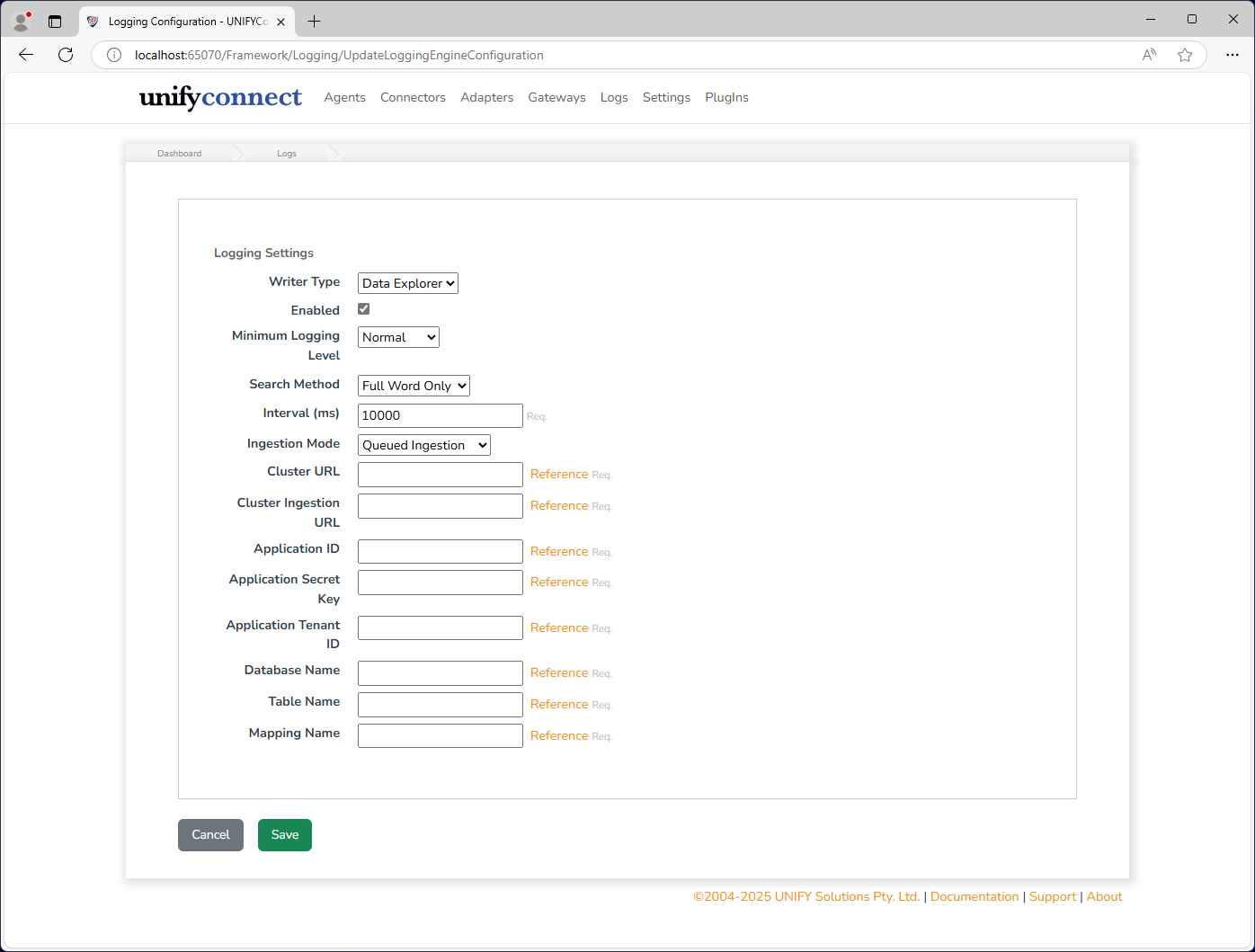
| Attribute | Description |
|---|---|
| Enabled | If the log writer is enabled. If not, logs will not be written to the CSV files. |
| Minimum Logging Level | The minimum allowable logging level for the log writer. Logs that fall below this logging level will not be written. |
| Search Method | How UNIFYConnect performs search queries, and relates to how log searches are performed via the log viewer. See below for the differences between the available options. |
| Interval | The time, in milliseconds, between polling uploads. Note this is unrelated to the ingestion mode. |
| Ingestion Mode | Specifies the method in which data is ingested into Data Explorer. See below for the pros and cons of the available modes. |
| Cluster URL | The URL to the Data Explorer cluster. This will be listed in the overview of the cluster in Azure portal. |
| Cluster Ingestion URL | The ingestion URL to the Data Explorer cluster when Queued Ingestion mode is used. This will be listed in the overview of the cluster in Azure portal. |
| Authentication | The Azure credential to use. See Azure Writer Authentication. |
| Client ID | Required for Client secret. Optional for Workload identity and Managed identity. For managed identity, leave blank for the system-assigned identity or specify a user-assigned identity client ID. Hidden for the default credential chain. |
| Application Secret Key | The application secret. Required and displayed only for Client secret. |
| Application Tenant ID | Required for Client secret and an optional override for Workload identity. Hidden for other modes. |
| Database Name | The name of the Data Explorer database. |
| Table Name | The name of the table created for UNIFYConnect logs. |
| Mapping Name | The name of the JSON mapping created in the logs table. |
Authentication
The inbuilt writer uses the selected credential for log ingestion and for queries made by the UNIFYConnect log viewer. Selecting Workload identity or Managed identity creates only that credential, so both operations use the same explicitly selected identity. Refer to Azure Writer Authentication for the mode behavior and host requirements.
Search Method
Full Word Only
This method uses the has query keyword, which is more performant, but only matches on full words only. For example, when using this mode performing a search on error will only display logs containing error exactly, but not errors or erroring.
Any Occurrence
This method uses the contains query keyword, which is less performant but matches of any occurrence of the search string in the log text. For example, when using this mode performing a search on error will not only display logs containing error exactly but also errors, erroring and any others that contain that series of characters.
Ingestion Mode Considerations
When using Queued Ingestion mode with the inbuilt log writer it should be noted that the ingestion delay will mean that logs will not appear in the log viewer for up to several minutes after the event has occurred. If low latency logging is required, such as during configuration or debugging, consider switching to Streaming Ingestion temporarily.
Refer to the Data Explorer Log Writer page for specific details on the different modes.
TIP
When using the data explorer as the default log writer, It is recommended to view the logs in the data explorer instance rather than using the in-app log viewer.