UNIFYConnect SQL Server Database Recommendations
Keeping in mind organisational policies surrounding the creation and maintenance of SQL Server databases, it is recommended that the latest released version of SQL Server is used, in addition to the following recommendations relating to the performance and security of the UNIFYConnect database.
Performance
For maximum database performance, it is recommended that the UNIFYConnect database files are located on a high speed disk without contention from other systems. Standard SQL Server best practices should be followed, including Optimizing tempdb Performance.
In addition, there are some settings that can be changed during the creation of the database that have the potential to greatly improve the performance of UNIFYConnect.
File Settings
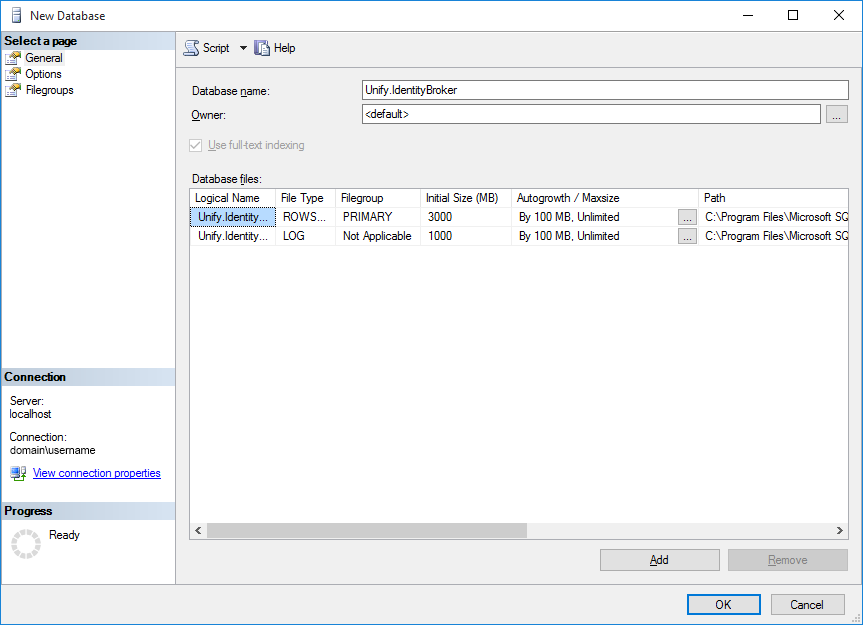
The Initial Size setting for the Rows Data should be set to the size that the database is expected to grow to. This can be approximated at 20MB hard drive space per 1000 identities.
The Initial Size setting for the Log should be set to roughly 1/3 of the size of the Rows Data setting.
The Autogrowth setting should be changed from the default to avoid database fragmentation and reduce the chance of SQL Server from having to create space during the middle of an operation. A setting of 100MB generally avoids these problems. This setting should be seen as a contingency for unexpected growth, with monitoring and alerts allowing the database administrator to manually set the desired file size (see Considerations for the "autogrow" and "autoshrink" settings in SQL Server for best practices).
The Maximum File Size should be set to a reasonable limit to avoid the database filling the disk, whilst at the same time not restricting legitimate size increases.
Options
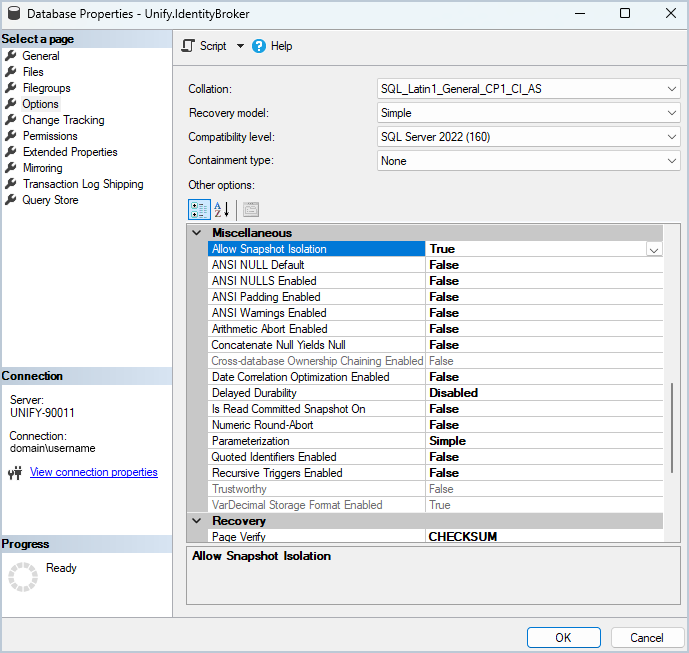
- Recovery model For an Identity Management solution that does not require point-in-time recoverability (connected systems can successfully resolve references to new objects by performing a full import), this setting should be set to _Simple_for maximum performance.
- Snapshot Isolation: Allowing snapshot isolation is requiredto ensure that the transactions operate on a consistent state of the data.
UNIFYConnect
For systems with high activity, it may be necessary to schedule recurring periods of inactivity, to allow database indexes to return to near 0% fragmentation. Please see Connector Overview for details on configuring Connector Schedules. Additional SQL Server Agent jobs may have to be created to force index rebuild or reorganise, as well as update statistics.
Data Integrity
Through the use of Configuring Microsoft Distributed Transaction Coordinator UNIFYConnect is designed to be resilient to data loss or failed database transactions. In the unlikely situation where data does become inconsistent/incorrect (for example MS DTC being disabled or misconfigured), UNIFYConnect will recover its data through the regular full import cycles - identity management platforms should be configured to allow for this to process to occur preventing import cycles from deleting missing data. Larger deployments may wish to employ other strategies for recoverability, such as backups (regular, incremental, and/or transactional).
Security
These options are available for securing the UNIFYConnect database:
- Using SQL Server Authentication:Create a new Microsoft SQL Server account with the necessary permissions on the
Unify.IdentityBrokerdatabase. - Using Windows Authentication:Use a Windows user account to connect to the database. In this case, configure the connection string with
Integrated Security=true, which enables the use of Windows account credentials.
To properly set up a connection to Microsoft SQL Server, ensure your connection string is configured correctly. Connection strings for SQL Server should specify either user credentials (for SQL Server authentication) or integrated security (for Windows authentication)
For more details on configuring the connection strings, refer to the documentation.
SQL Server required permissions:
db_datareaderdb_datawriter
The above settings are generally the minimum required, however, some instances of SQL Server are set up in such a way that further permissions are required. Should UNIFYConnect log an exception pertaining to incorrect privileges whilst creating a temporary table, please grant db_owner to the appropriate account.
TIP
Roles can be added to a user using ALTER ROLE. E.g. ALTER ROLE db_owner ADD MEMBER username
Maintenance Tasks
Statistics
The UNIFYConnect database should be maintained by a regular Update Statistics task, using the full scan option to avoid miscalculations. The task should be run as often as necessary to avoid performance degradation, or in cases where certain Connectors or Adapters are performing noticeably worse than others. A good starting point is to schedule the task to run nightly. Do not schedule after an index rebuild as it will result in duplicate work (after a reorganize is fine). An example script that updates statistics for all tables:
EXEC sp_MSforeachtable @command1="print '?'", @command2="UPDATE STATISTICS ? WITH FULLSCAN"Indexes
As with ensuring that statistics are up to date, the indexes play an important role in the correct functioning of UNIFYConnect. At the very minimum a weekly Rebuild Index Task (Maintenance Plan) should be set up. This can be further optimized by first determining the level of fragmentation and then running the appropriate command, taking into consideration the SQL Server license restrictions (for example online rebuild only being available in the Enterprise edition). Performance should be monitored and the frequency of the task changed as appropriate. An example script that updates indexes on all tables:
EXEC sp_MSforeachtable @command1="print '?'", @command2="ALTER INDEX ALL ON ? REBUILD WITH (ONLINE=OFF)"Microsoft Azure SQL Database
As SQL in Azure does not support all features available in the on-premises version, the above maintenance queries will not work as-is. A starting point to replace the index rebuild query is as follows:
DECLARE @Table varchar(255)
DECLARE TableCursor CURSOR FOR
SELECT '[' + table_schema + '].[' + table_name + ']' FROM information_schema.tables
WHERE table_type = 'base table'
OPEN TableCursor
FETCH NEXT FROM TableCursor INTO @Table
WHILE @@FETCH_STATUS = 0
BEGIN
  EXEC('ALTER INDEX ALL ON ' + @Table + ' REBUILD')
  FETCH NEXT FROM TableCursor INTO @Table
END
CLOSE TableCursor
DEALLOCATE TableCursor