PowerShell Transformation
Overview
This transformation allows execution of an arbitrary PowerShell script to modify entities.
NOTE
View PowerShell in UNIFYConnect for more information on the version of PowerShell used by UNIFYConnect.
Use Cases
The PowerShell transformation can be used to accomplish the following:
- Calls out to external systems;
- Decisions based on other entity values;
- String manipulation;
- etc.
Prerequisites
None.
Contribution
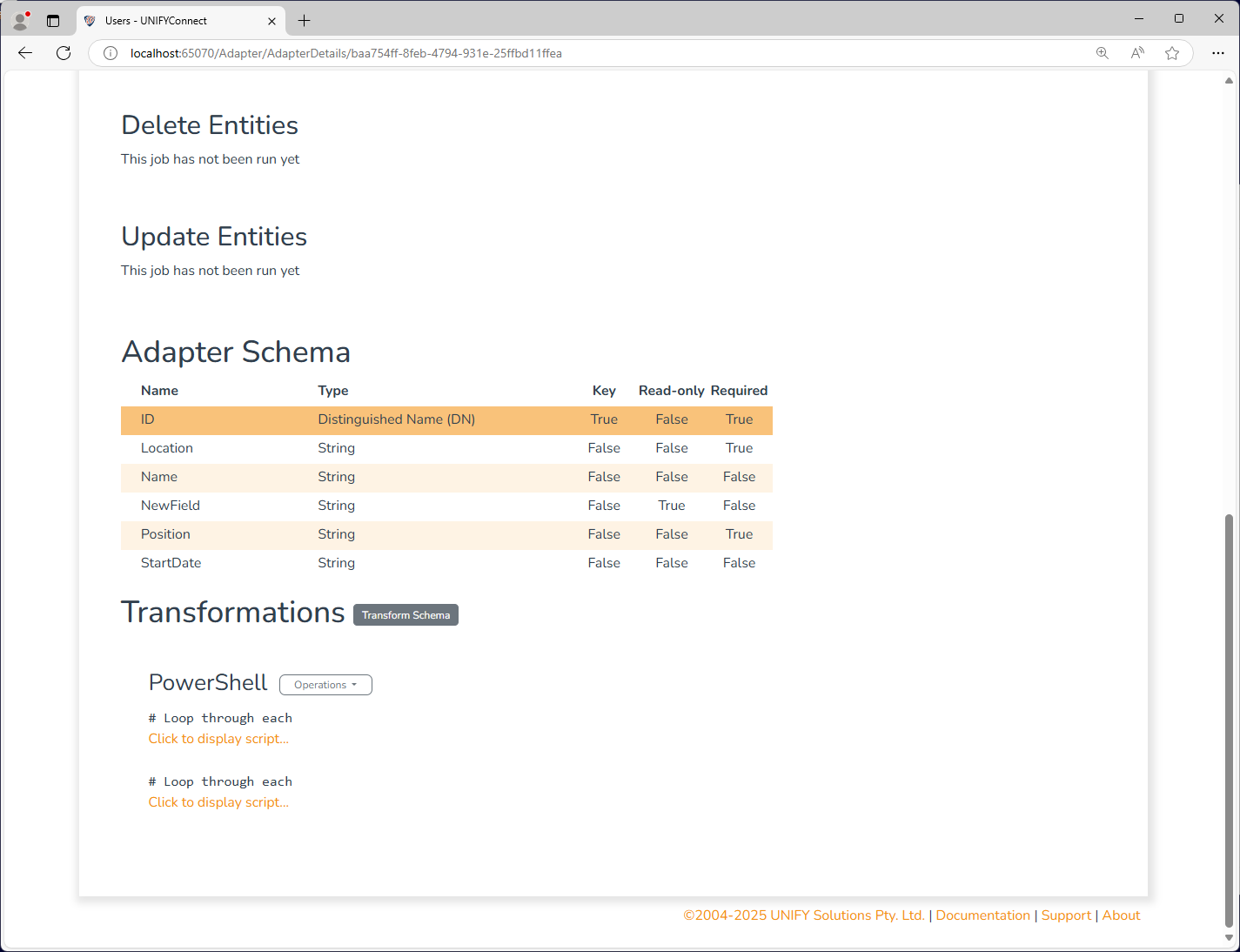
This transformation does not have a fixed contribution - instead a PowerShell script must be supplied to add fields to the schema. All fields added by this transformation are marked read-only and not required.
Configuration
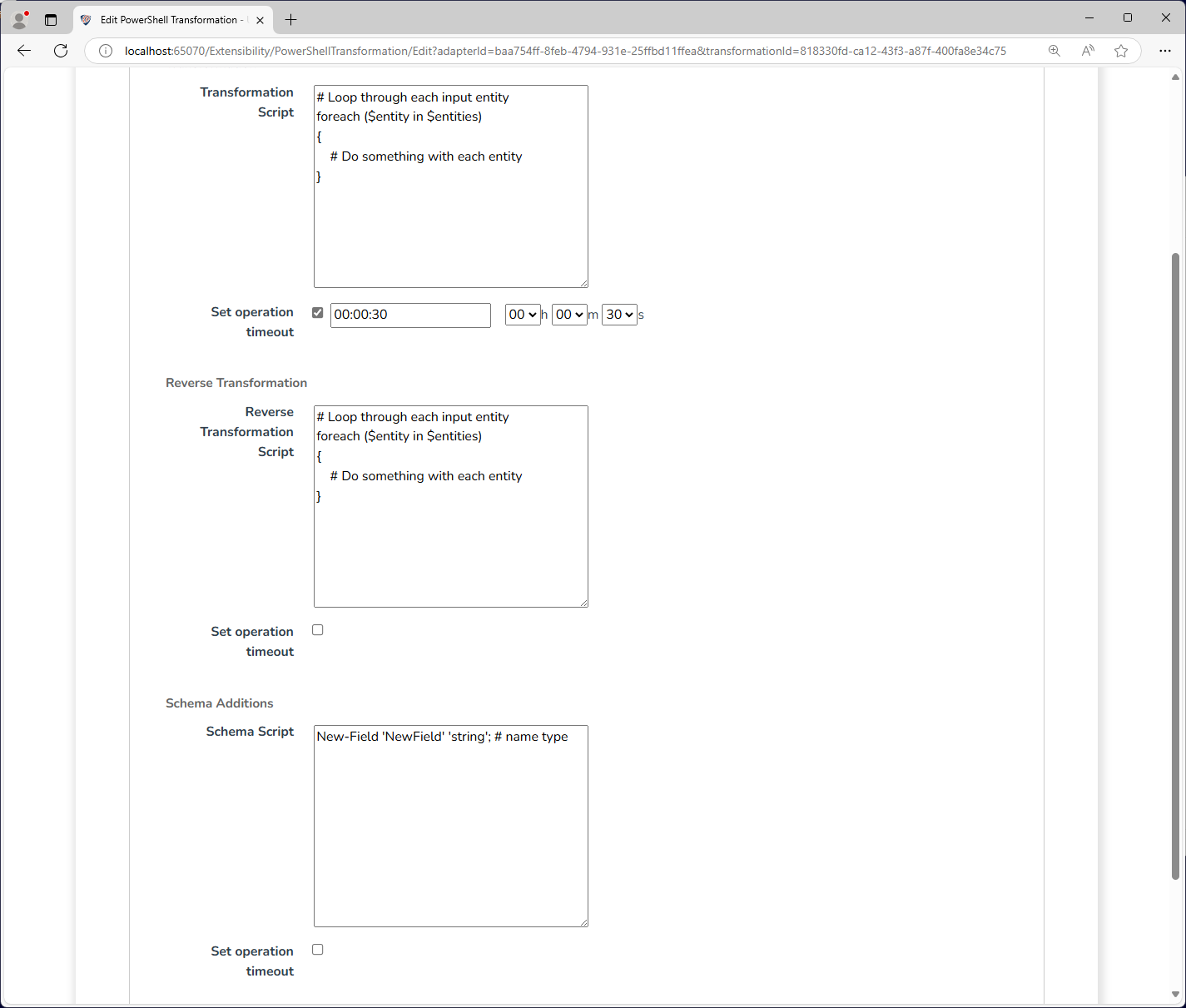
The PowerShell transformation requires the following by way of configuration:
| Attribute | Description |
|---|---|
| Transformation Script | The PowerShell script to execute to modify entities. |
| Reverse Transformation Script | The PowerShell script to reverse transformtion entities. |
| Schema Script | The PowerShell script to execute to modify the schema. |
The above example defines a new string-valued schema field in the Adapter Schema, and assigns the value 'New Value' for all entities. The PowerShell transformation can not only assign values to the newly defined fields, but can also add, modify and remove values for existing fields.
Entities can be retrieved via the $entities component. See PowerShell Transformation Entities for details on how entities can be interacted with.
Both the Transformation Script and the Schema Script also have access to the logger component.
Operation Timeout
All script type supported by the PowerShell transformation provide the option to set an operation timeout. If enabled, UNIFYConnect will forcibly terminate the execution of a PowerShell script once the configured duration has passed.
WARNING
The termination of an executing PowerShell script from an exceeded operation timeout may result in an undesired state, depending on the script and its behaviour. In these cases, it is recommended to handle the termination gracefully from within the script where this is possible, and rely on the operation timeout for cases where it is not.
Change Processing
The PowerShell transformation does not participate in the change detection process by default. This can be enabled by manually describing the fields which contribute in some way to other fields, either created by the transformation, or pre-existing.
To do this, call the Register-Contribution method in the Schema Script for each instance of one field contributing to another.
# The existing field 'fieldA' contributes to the resulting value
# in 'fieldB', added by the PowerShell transformation.
Register-Contribution 'fieldB' 'fieldA';Manual field-contribution registration is not required for most fields and can usually be omitted from the schema script. It is typically required when a PowerShell transformation precedes a Time Offset Flag or Business Day Offset transformation. In these cases, the contribution chain for the relevant timestamp or date fields is needed to schedule future-dated changes correctly. Registration can also be useful when a field created by a PowerShell transformation is used in a relational transformation's join criteria; otherwise, changes to the relational target do not trigger a change in the adapter containing this transformation.
Notes:
- Only add Register-Contribution where the output of your transformation is required to calculate future-dated changes (such as the Time Offset Flag). If the field is not used as an input to one of those transformations (either directly or indirectly), do not add this qualifier.
- With Register-Contribution, transformations will be executed many additional times to calculate future-dated changes as part of the change detection pipeline.
- Due to this inclusion, the transformation may run on partial source entities where source fields have a NULL value. Because of this, always null-check fields you're using as part of your transformation. It's okay if your transformation does nothing in scenarios where the data isn't what it expects.
- Only one existing field can contribute to one output field. Multiple Register-Contribution calls mapping different inputs to the same output may cause invalid future-dated changes or crashes. If you have multiple calculations for multiple fields or unrelated logic, perform them in separate scripts.
- Do not call web services, databases, or external APIs inside the transformation. The transformation could be invoked many times during an import, leading to slow import execution or unintended side effects.