Migrating UNIFYConnect Between Environments
Configuration Migration
UNIFYConnect uses a local storage mechanism for persisting its configuration. This is located in a series of JSON files located in the %InstallDir%\Services\Extensibility directory.
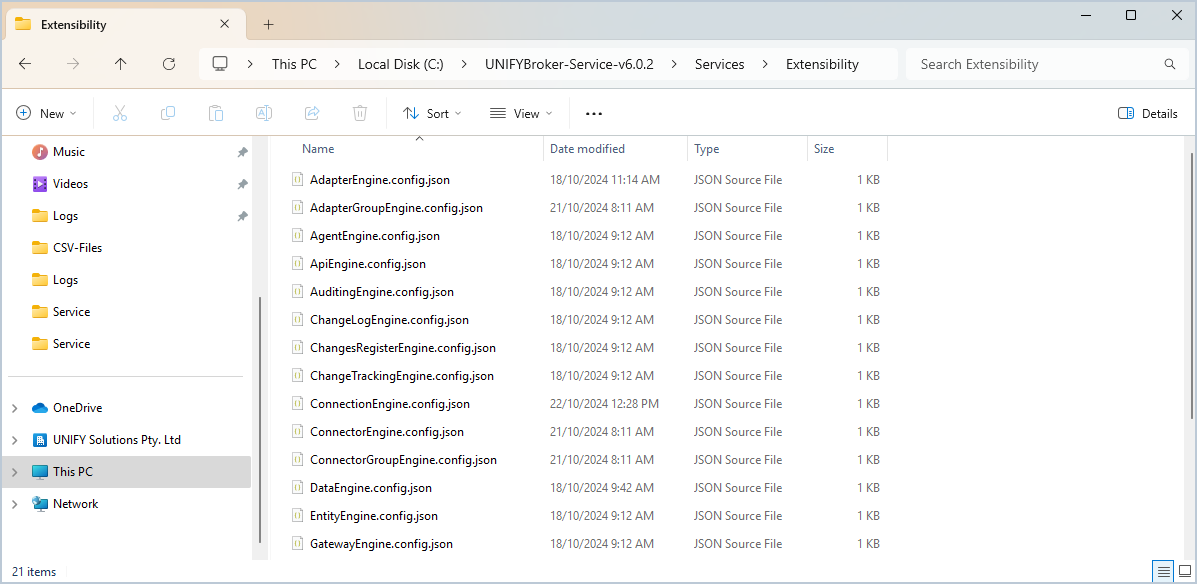
Migrating between development, test, and production environments can be as simple as copying the contents of this directory into the Extensibility directory of the new environment. When the UNIFYConnect service is restarted, the new configuration will be loaded.
NOTE
The UNIFYConnect service must be STOPPED on both source and target migration installations. Simply stopping the scheduler is not enough to guarantee the configuration is migrated correctly.
The key extensibility files are:
| Filename | Description |
|---|---|
| ApiEngine.config.json | Contains default and additional APIs configuration. |
| AuditingEngine.config.json | Contains default and additional auditing configuration. |
| DataEngine.config.json | The connection details to the UNIFYConnect database. |
| LoggingEngine.config.json | Contains default and additional logging configuration. |
| AdapterEngine.config.json | The configuration for Adapters. |
| AdapterGroupEngine.config.json | The configuration for Adapter Groups. |
| AgentEngine.config.json | The configuration for Agents. |
| ChangeLogEngine.config.json | Configuration for the LDAP change log feature. |
| ConnectorEngine.config.json | The configuration for Connectors. |
| ConnectorGroupEngine.config.json | The configuration for Connector Groups. |
| GatewayEngine.config.json | The configuration for Gateways. |
| SecurityEngine.config.json | The LDAP Security configuration. |
All other extensibility JSON files are required by the service, but do not contain any configuration that would change between environments.
NOTE
Plugin specific configuration files may be added when installing plugins. Check the appropriate migration documentation for your installed plugins to determine if any other configuration files also need migration.
In addition to the extensibility files, some environments may have also updated the following files:
web.configappsettings.json
If these files have been modified, they should also be migrated.
External Value Store
The external value store file is located at %InstallDir%\Services\Extensibility\UNIFYBroker.store.config.json. If any extensibility files reference an external value, the new environment will need an external value store file with the same schema. It is not recommended to copy the external store file between environments, as it is very likely to contain environment specific variables, some of which may be considered sensitive information. This file should instead be templatised, and the template used to recreate the store file for each new environment.
Migration Considerations
There are a few issues to consider when migrating configuration between environments:
- Ensure that the database has been correctly migrated and that the Data Configuration is targeting the correct database.
- Partial migrations are possible using the table above, however, the absence of configured agents will result in incomplete connector configuration.
- Any partitions (e.g. Connector, Adapter, Locker, etc.) that are removed from configuration will result in the entities being removed from the UNIFYConnect database.
- Agent configuration is not updated when the configuration is migrated. This means that agents will still use the server names specified in the source environment. Consider the use of aliases or external value store references to ensure configuration remains consistent.
- If aliases are not used, Agents will need to be reconfigured to point to the relevant servers in the new environment.
- Individual connectors need not be updated unless they reference items that are located in a different location to the base environment, such as PowerShell Connector.
- It is advisable to disable the UNIFYConnect scheduler before stopping the service to migrate configuration. If the scheduler is enabled, scheduled operations may begin running before you've had a chance to confirm the migration has completed successfully.