SCIM Mapping
Configuration
When a user or group adapters are configured in the SCIM gateway, mappings will need be configured for each. These mappings dictate how entity data should be converted to and from SCIM resource data.
External ID Field
externalID is a special field in the SCIM schema for an identifier assigned and managed by the SCIM client. This can be mapped to an entity value by selecting a field in the External Id Field selection. This is not a required configuration for the SCIM gateway, however some clients may require this to be persisted.
Basic Mapping
User and Group mappings are a set of entries which define a link between a SCIM path and an adapter schema field. As many mappings may be added to each section (User and Group) as desired.
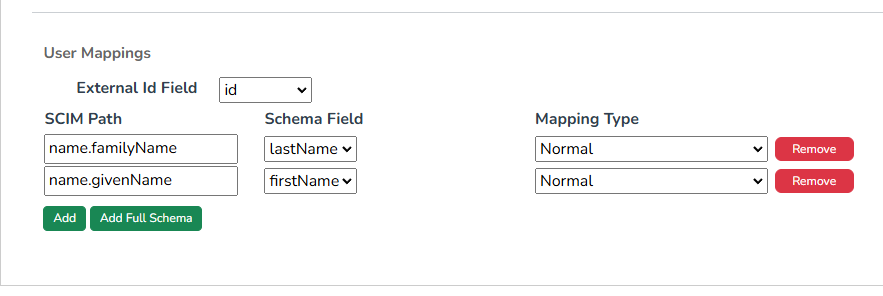
| Name | Description |
|---|---|
| SCIM Path | Defines the location in the SCIM schema to map to and from. This field supports many options to provide flexibility in mapping different types of data. For more information on this, see the SCIM Path Format section below. |
| Schema Field | The adapter schema field to map to and from SCIM data. |
| Mapping Type | How the mapping between entity and SCIM data should be performed. See the Mapping Type sections below for more information on the available types. |
Normal Mapping Type
The default mapping type, and the one that should be used in most cases. Values are mapped directly between the location defined by the SCIM path without and special handling.
Referenced Entity DN/Field Value Mapping Types
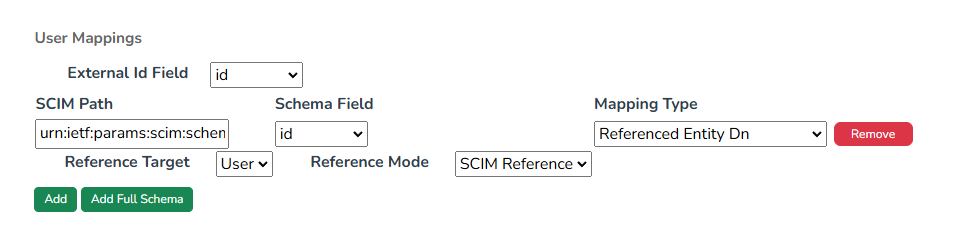
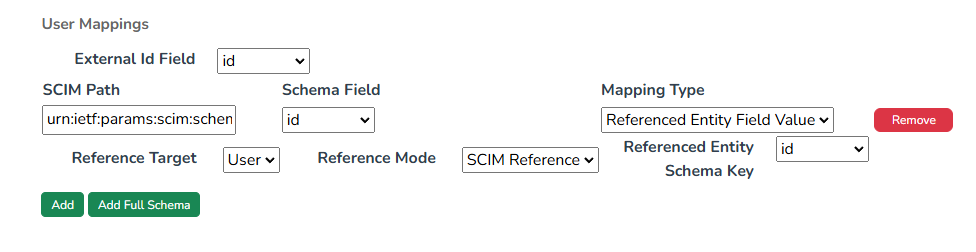
Some SCIM fields, such as the urn:ietf:params:scim:schemas:extension:enterprise:2.0:User:manager, contain a reference to the identifier of another entity. For the SCIM gateway, this would be the adapter entities Entity Id. The Referenced Entity DN and Referenced Entity Field Value mapping types allow this identifier to be mapped to the distinguished name or a field value from the referenced entity.
Using one of these mapping types requires additional configuration.
| Name | Mapping Type | Description |
|---|---|---|
| Reference Target | Both | The configured adapter which the referenced entity belongs to. Cannot use a target which has not been configured in the gateway. |
| Reference Mode | Both | The format of the reference required by the SCIM schema. |
| Reference Entity | Field Value | The field containing the reference value. The value from this field will be used in mapping when converting from SCIM data to entity, and will be used to lookup the referenced entity id when converting from entity to SCIM. |
Reference Modes
| Mode | Description |
|---|---|
| SCIM Reference | For fields like the manager field previously mention for which the value is a well-defined reference data type object |
| Simple Value | For fields that contain the reference id as simple value |
SCIM Path Format
The SCIM path component of a mapping defines the logical path into a nested SCIM object schema,so that the flat data structure of a UNIFYConnect adapter entity can be inserted and extracted from it. The format of a SCIM path is based on a subset of the SCIM patch path and filter format.
Attribute Name SCIM Path
The simplest form for a SCIM path is a simple attribute name. Attribute names are a sequence of alpha-numeric characters,hyphens and underscores, where the first character is a alphabetic character. If the attribute is defined in a SCIM extension, the attribute name would be prepended by the extensions URI, separated by a colon (:).
Some valid attribute name SCIM paths are:
username
id_number
urn:ietf:params:scim:schemas:extension:ExampleExt:barcodeWhen attribute name SCIM paths are used in mappings, the expected and resulting SCIM resource would have that value as a top level attribute. For example, with the above example SCIM paths:
{
  ...
  "username": "joeExample",
  "id_number": 46734,
  "urn:ietf:params:scim:schemas:extension:Example": {
    "barcode": "TG9yZW0gaXBzdW0gZG9sb3Igc2l0IGFtZXQ="
  }
  ...
}Nested Attribute Name SCIM Path
As a SCIM resource is a nested data structure, SCIM paths can include sub-attribute names following the top level attribute name, separated by a full stop character (.). Like above, extension URI can precede the top-level attribute name.
Some valid nested attribute name SCIM paths are:
name.givenName
name.familyName
department.location.address
urn:ietf:params:scim:schemas:extension:ExampleExt:rule.contactableWhen nested attribute name SCIM paths are used in mappings, the expected and resulting SCIM resource would have a nested structure of objects following the attribute and sub-attribute chain, with the value added under the final sub-attribute. For example, with the above example SCIM paths:
{
  ...
  "name": {
    "givenName": "Joe",
    "familyName": "Example"
  },
  "department": {
    "location": {
      "address": "1 Example Rd"
    }
  },
  "urn:ietf:params:scim:schemas:extension:ExampleExt": {
    "rules": {
      "contactable": true
    }
  }
  ...
}Qualified Multi-value SCIM Path
Some SCIM fields support multiple values, and typically are represented as arrays of objects, with each object having a type value and one or more other values. The SCIM path to map these kind of values starts with a attribute name, zero or more sub-attribute names, a qualifying filter in square brackets, followed by one or more sub-attributes.
Unlike the full SCIM filter format, the only operators permitted in a SCIM path filter are equality (eq) and logical and (and). When converting from SCIM resource to entity, the filter is used as a filter to select the correct item from the array to map. Conversely, when converting an entity to a SCIM resource, the values defined in the qualifying filter are extracted and directly used to populate the mapped multi-value objects.
Some valid qualified multi-value SCIM paths are:
phoneNumbers[type eq 'home'].value
phoneNumbers[type eq 'other'].value
addresses[type eq 'work'].street
addresses[type eq 'work'].postcode
departments[type eq 'current' and active eq true].roleWhen qualified multi-value SCIM paths are used in mappings, the expected and resulting SCIM resource would have an array of objects containing the qualified values from the filter and the mapped sub-attribute values. For example, with the above example SCIM paths:
{
  ...
  "phoneNumbers": [
    {
      "type": "home",
      "value": "1234 5678"
    },
    {
      "type": "other",
      "value": "9999 9999"
    }
  ],
  "addresses": [
    {
      "type": "work",
      "street": "Example Rd",
      "postcode": "1000"
    }
  ],
  "departments": [
    {
      "type": "current",
      "active": true,
      "role": "manager"
    }
  ]
  ...
}Full SCIM Path Reference
The following is the full definition of the allowed SCIM path format, in ABNF rules notation. This is a subset of the rules defined by the SCIM specification, sections 3.5.2 and 3.5.2. The key differences is limiting expression operators to equality and boolean and_._
PATH = attrPath / valuePath subAttr

valuePath = attrPath "[" valFilter "]"

valFilter = attrExp / logExp

attrExp   = attrPath SP "eq" SP compValue

logExp    = valFilter SP "and" SP valFilter

compValue = false / true / number / string

attrPath  = [URI ":"] ATTRNAME *1subAttr

ATTRNAME  = ALPHA *(nameChar)

nameChar  = "-" / "_" / DIGIT / ALPHA

subAttr = "." ATTRNAMESchema Field Types Mapping Behaviour
The following table describes how each of the UNIFYConnect entity schema field types get mapped into SCIM resource JSON, and any type-specific details.
| Schema Field Types | Mapped JSON type | Notes |
|---|---|---|
| Boolean | boolean | |
| Binary | string | In base64 encoding |
| Byte | number | |
| Time | string | Using constant formatting |
| Timestamp | string | Using round trip formatting |
| Date | string | Using round trip formatting |
| Decimal | number | |
| DN | string | |
| GUID | string | Using 00000000-0000-0000-0000-000000000000 format |
| Integer | number | |
| Long | number | |
| Double | number | |
| Short | number | |
| Single | number | |
| String | string | |
| Complex | based on value | Complex value is directly mapped into and from SCIM resource JSON. This can be used to support non-standard client features or formatting, if needed. Not recommended for typical use cases. |
| Multi-Value | array | Array items based on type of multi-value |