PowerShell Runspaces For UNIFYConnect
Overview
Previous versions of UNIFYConnect ran Windows PowerShell scripts in-process, allowing extensible functionality for people familiar with scripting languages.
From UNIFYConnect v6 onwards, a shift to PowerShell 7 highlighted issues with executing these scripts in-process, particularly with relation to memory usage and performance.
UNIFYConnect v7.2 added the ability to reuse runspaces inside the service (Managed PowerShell Runspaces), avoiding the overhead of recreating and reloading modules on each script execution. This improved performance but did not solve the memory-usage problem.
UNIFYConnect v8.0 added an (out-of-process runner), retaining runspace reuse while allowing the worker process to be recycled without affecting the UNIFYConnect service.
Managed PowerShell Runspaces (v7.2+)
The use of managed PowerShell runspaces allows the reuse of PowerShell runspaces from a pool of active runspaces. This reduces the overhead of creating a new runspace and improves the performance.
NOTE
While managed runspaces are enabled, modifications to external PowerShell modules may not be picked up, as PowerShell caches module imports. To ensure module changes are picked up, use the Refresh Runspaces option. For ongoing development scenarios, it's recommended to disable managed runspaces, and re-enable once complete.
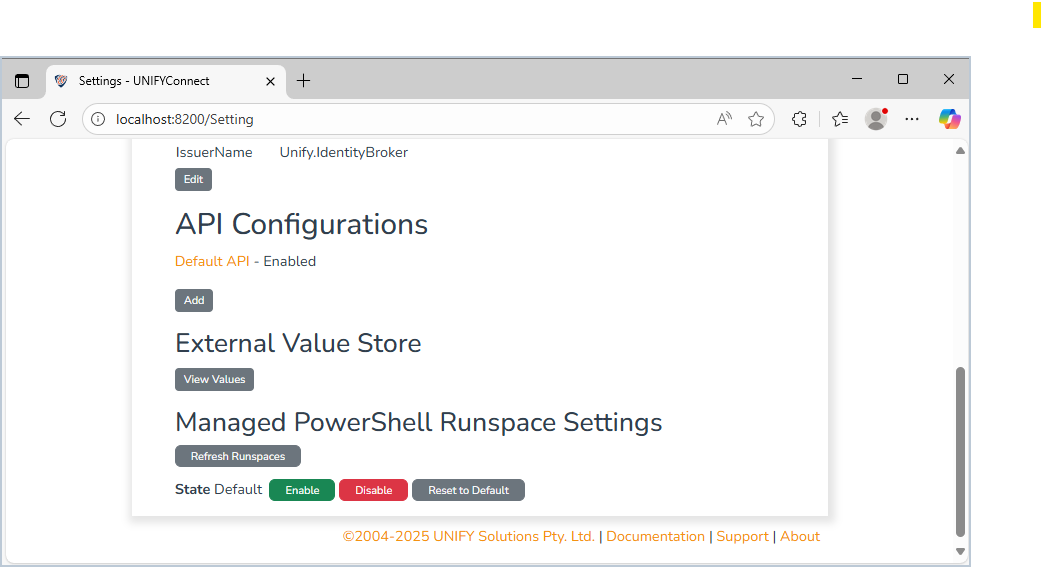
Use Enable or Disable to change managed runspace use for all UNIFYConnect engines at runtime. Managed runspaces are enabled by default unless an engine configuration overrides them. Reset To Default restores the settings defined in each engine's configuration. Refresh Runspaces immediately disposes of cached runspaces, releases their resources, and forces new runspaces to be created.
NOTE
When the managed PowerShell runspace state has been changed at runtime, it is recommended to restart the service to ensure efficient resource usage - as PowerShell stores global state that can't be refreshed, causing memory to grow over time. Note that this setting is not permanent. For lasting changes, update the configuration files directly.
Out-of-Process PowerShell Execution (v8.0+)
Out-of-process PowerShell execution runs scripts in a separate worker process rather than inside the main UNIFYConnect service. This isolates script execution and allows the worker process to be recycled without restarting the service.
In v8.0, in-process execution is the default. An individual script usage can select WorkerProcess with the powerShellExecution setting described below. To force every supported PowerShell usage to run in the worker, set ForceOop in the powerShellSettings section of Services/appsettings.json:
"powerShellSettings": {
  "ForceOop": true
}The packaged worker is located at Services/Workers/PowerShell/Unify.IdentityBroker.PowerShellWorker.exe on Windows and Services/Workers/PowerShell/Unify.IdentityBroker.PowerShellWorker on Linux. Normally its path is detected automatically. Use WorkerExePath only to override that location:
"powerShellSettings": {
  "ForceOop": false,
  "WorkerExePath": "D:\\UNIFYConnect\\Services\\Workers\\PowerShell\\Unify.IdentityBroker.PowerShellWorker.exe"
}The equivalent command-line options are --powershell-force-oop and --powershell-worker-exe-path.
WARNING
Values passed between the service and worker are serialized. Test existing scripts before enabling out-of-process execution, particularly scripts that depend on process-local .NET objects, static state, or modules with native dependencies. Use the APIs exposed through the script's $components object to interact with UNIFYConnect.
Configuration
Common Engine Configuration
The following settings can be set in the configuration file for each engine. Default values are used when no engine-level PowerShell configuration object is present.
| Property | Description | Required |
|---|---|---|
runspaceManagementMode | Allowed values are SharedRunspace (the default) and None. Required when an engine-level PowerShell configuration object is present. | Conditional |
usageSettings | A collection of settings for the engine's PowerShell script usages. Required when an engine-level PowerShell configuration object is present; use an empty array if no usages are overridden. | Conditional |
scriptType under usageSettings | The type of script to which the settings apply. Each engine has a set of supported values listed below. | Yes |
powerShellExecution under usageSettings | Allowed values are InProcess (the default) and WorkerProcess. | No |
lockWaitTimeout under usageSettings | How long to wait for a runspace in use to become available. A default value is defined for each script type. | No |
poolGrowthLimit under usageSettings | The maximum number of pooled runspaces. A default value is defined for each script type. | No |
outOfProcessSettings | Settings that control worker-process lifetime and resource limits. | No |
workerLifetimeLimit under outOfProcessSettings | The maximum worker-process lifetime. The default is 24 hours. | No |
workerMemoryLimit under outOfProcessSettings | The worker-process memory limit in bytes. The default is 1 GiB. | No |
workerMaxConcurrentExecutions under outOfProcessSettings | The maximum number of concurrent scripts a worker process can execute. The default is 200. | No |
$version | The latest configuration-object version is "1.0". | Yes |
Connector Engine Configuration
| Property | Description | Required |
|---|---|---|
| scriptType | Can take any of the following values: GetAll, PollIdChanges, PollIdEntity, PollEntityChanges, Add, Update, Delete, DeleteAll, ModifyAnchor, ChangePassword, Schema. | Yes |
| poolGrowthLimit | The default for all script types is 5. | No |
| lockWaitTimeout | The default is -00:00:00.001 for all script types (i.e. no waiting for an available runspace). | No |
Example
"powerShellConnectorRunspaceSettings": {
  "$version": "1.0",
  "runspaceManagementMode": "SharedRunspace",
  "usageSettings": [
    {
      "scriptType": "GetAll",
      "powerShellExecution": "WorkerProcess",
      "lockWaitTimeout": {
        "$fmt": "timeSpan",
        "$value": "01:05:00"
      },
      "poolGrowthLimit": 2
    }
  ],
  "outOfProcessSettings": {
    "workerLifetimeLimit": {
      "$fmt": "timeSpan",
      "$value": "04:05:00"
    },
    "workerMemoryLimit": 500000000,
    "workerMaxConcurrentExecutions": 100
  }
}Adapter Engine Configuration
| Property | Description | Required |
|---|---|---|
| scriptType | Can take any of the following values: Transform, ReverseTransform, TransformSchema, JoinSelection. | Yes |
| poolGrowthLimit | The default for JoinSelection is 6. The default for the other script types is 5. | No |
| lockWaitTimeout | The default is -00:00:00.001 for all script types (i.e. no waiting for an available runspace). | No |
Example
"transformationPowerShellRunspaceSettings": {
  "$version": "1.0",
  "runspaceManagementMode": "SharedRunspace",
  "usageSettings": [
    {
      "scriptType": "Transform",
      "powerShellExecution": "InProcess",
      "lockWaitTimeout": {
        "$fmt": "timeSpan",
        "$value": "01:05:00"
      },
      "poolGrowthLimit": 5
    }
  ],
  "outOfProcessSettings": {
    "workerLifetimeLimit": {
      "$fmt": "timeSpan",
      "$value": "04:05:00"
    },
    "workerMemoryLimit": 500000000,
    "workerMaxConcurrentExecutions": 100
  }
}Logging Engine Configuration
| Property | Description | Required |
|---|---|---|
| scriptType | Can take any of the following values: Logging | Yes |
| poolGrowthLimit | The default is 5. | No |
| lockWaitTimeout | The default is -00:00:00.001 (i.e. no waiting for an available runspace). | No |
Example
"powerShellRunspaceSettings": {
  "$version": "1.0",
  "runspaceManagementMode": "SharedRunspace",
  "usageSettings": [
    {
      "scriptType": "Logging",
      "powerShellExecution": "InProcess",
      "lockWaitTimeout": {
        "$fmt": "timeSpan",
        "$value": "01:05:00"
      },
      "poolGrowthLimit": 7
    }
  ],
  "outOfProcessSettings": {
    "workerLifetimeLimit": {
      "$fmt": "timeSpan",
      "$value": "04:05:00"
    },
    "workerMemoryLimit": 500000000,
    "workerMaxConcurrentExecutions": 100
  }
}Auditing Engine Configuration
| Property | Description | Required |
|---|---|---|
| scriptType | Can take any of the following values: Auditing | Yes |
| poolGrowthLimit | The default is 5. | No |
| lockWaitTimeout | The default is -00:00:00.001 (i.e. no waiting for an available runspace). | No |
Example
"powerShellRunspaceSettings": {
  "$version": "1.0",
  "runspaceManagementMode": "SharedRunspace",
  "usageSettings": [
    {
      "scriptType": "Auditing",
      "powerShellExecution": "InProcess",
      "lockWaitTimeout": {
        "$fmt": "timeSpan",
        "$value": "01:05:00"
      },
      "poolGrowthLimit": 4
    }
  ],
  "outOfProcessSettings": {
    "workerLifetimeLimit": {
      "$fmt": "timeSpan",
      "$value": "04:05:00"
    },
    "workerMemoryLimit": 500000000,
    "workerMaxConcurrentExecutions": 100
  }
}Channel Engine Configuration
| Property | Description | Required |
|---|---|---|
| scriptType | Can take any of the following values: Channel | Yes |
| poolGrowthLimit | The default is 5. | No |
| lockWaitTimeout | The default is -00:00:00.001 (i.e. no waiting for an available runspace). | No |
Example
"powerShellRunspaceSettings": {
  "$version": "1.0",
  "runspaceManagementMode": "SharedRunspace",
  "usageSettings": [
    {
      "scriptType": "Channel",
      "powerShellExecution": "InProcess",
      "lockWaitTimeout": {
        "$fmt": "timeSpan",
        "$value": "01:05:00"
      },
      "poolGrowthLimit": 7
    }
  ],
  "outOfProcessSettings": {
    "workerLifetimeLimit": {
      "$fmt": "timeSpan",
      "$value": "04:05:00"
    },
    "workerMemoryLimit": 500000000,
    "workerMaxConcurrentExecutions": 100
  }
}